
Overview
NEOOC, in partnership with Richfield Heritage Preserve, is pleased to offer this self-serve orienteering event for exercise and fun.
Similar to the previous events of this type, we will be using the iOrienteering app for electronic timing on your smart phone. We’ll also have all of the courses set up in Livelox, for those who prefer a hands-free run.
However, all of the courses can be enjoyed without the Tech, by logging the key words on the marker flags (and/or as a backup for the apps). Self entry of Results will be available once the Courses are open!
Also, we suggest starting a stopwatch or keep track of your own time by some means, so that you can manually enter your results if needed.
One fee for one or ALL of the courses for your team!
Special Note: A short, free orienteering mini training class using these self serve courses and maps will held on Saturday, June 20, 9:30 at Richfield Heritage Preserve. Afterwards, go out on the courses. Bring a compass – baseplate type is preferred. Limited maps will be available. Print your own to be sure – find them below.
Park in the main Richfield parking lot by the Lodge (off of Broadview Road) and follow orienteering signs.
Questions; jay@neooc.com
Details
- Format: Classic Orienteering – 3 courses
- Beginner: planned 12 controls/2.3 km – Yellow
- Intermediate: 15 / 3.9 km – Orange
- Advanced: 16/4.5 km – Red
- Place: Richfield Heritage Preserve, Richfield, Ohio
- Park in the main parking lot off of Broadview Road. Enjoy the newly paved entrance.
- Dates and Times:
- Saturday June 20th thru Sunday 28th, Dawn to Dusk
- Orienteer on your schedule when the park is open
- The entry gate automatically closes at Dusk, opens at Dawn. NEOOC has NO control of this gate.
- The automatic gate WILL open to let you OUT if you run late.
- Suggested time limit: 3 Hours
- Controls: FULL SIZE control flags are in use and the courses are intended for Beginner, Intermediate, and Advanced skill level Orienteers.
- Water: Will not be on the course. Plan accordingly
- Map: 1:8000, 5 m contours. Bob Boltz 2017, with minor updates 2024 and 2025 (Buckeye Trail Reroute)
- Download links for course maps below.
- Livelox will be active for this event. Free app – find on your store. Sign in to the Livelox app on your smartphone to record your route directly to Livelox, or record it on your Garmin or other GPS tracker, and upload it to Livelox later.
- Similar to the previous events of this type, we will be using the iOrienteering app for electronic timing on your smart phone.
- PLEASE REVIEW THE WAIVER OF LIABILITY AND ASSUMPTION OF RISK BEFORE DOWNLOADING ANY COURSE MAP FROM THIS WEBPAGE. BY DOWNLOADING A MAP YOU ARE AGREEING TO THE TERMS OF THIS WAIVER AND ARE ABSOLVING NEOOC AND ORIENTEERING USA , ET AL OF LIABILITY RESULTING FROM YOUR PARTICIPATION IN THE ASSOCIATED ORIENTEERING ACTIVITY.
Smart Phone Apps
Automated, electronic scoring will be done using the iOrienteering
- iOrienteering: You can choose to manually scan the QR code on the Start, Finish and control flags to register a “punch” using the iOrienteering app on your smartphone.
- Use this link on your computer to set up your free account and get more information about iOrienteering
- Use this link on your Android smartphone to download and install the iOrienteering app
- Use this link on your Apple smartphone to download and install the iOrienteering app
- To use the iOrienteering app, once you have selected the course that you will be running and have downloaded the map, you will need to load the course details to your phone. Enter the 6-character course short code printed on your map.
- To use the iOrienteering app, see more details here.
- Livelox: is used for tracking and does not indicate punching in the field. Proximity punches will be computed on their website.
- To use the Livelox app, see more details here.
Park Usage,Guidelines, Woods/Venue Awareness
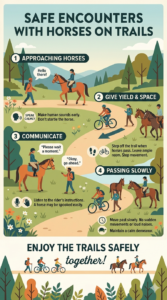
Richfield Hertiage Preserve is a mixed use park including equestrians. Please be respectful as others enjoy this park.
- As always, enjoy the event and be respectful of both flora and fauna.
- Be especially aware of social gatherings (including weddings) at both the Lodge and Amity House (including surroundings)
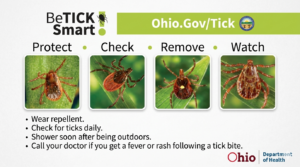
- Be Tick Smart! The best way to prevent tick bites is to treat skin and clothing before starting the event.
- Treat Clothing and Gear with Permethrin: Treating clothing and gear with 0.5% Permethrin (an insecticide) is a highly effective preventative measure. Spray clothing and allow it to dry completely before wearing. This treatment lasts two to three washes. You can also spray tents, boots and other outdoor gear
- Use DEET on Exposed Skin: For children 2 months of age or older, DEET is a safe and effective tick repellent. A 10% DEET product is good for shorter activities, while 20-30% DEET is best for longer exposure. Avoid products that include sunscreen, as DEET can reduce its effectiveness. Apply sunscreen first, wait about 30 minutes, and then use DEET if needed.
Course and Designer Notes
TELL SOMEONE WHAT YOU ARE DOING AND WHEN YOU EXPECT TO RETURN. SAFETY FIRST!
- Bridge over the upper lake dam is closed!
- Upper lake trail – western shore of upper lake is closed. Purple hatched.
- Purple Hatch = No go
- For these Classic-O courses, the idea is to find them in the specified order (Start -> 1 -> 2 -> … -> Finish).
- But plan a specific amount of time for your course. Find as many control flags-markers as you can, in the time that you have planned. It can be one hour or up to three hours. It’s up to you
- If you are having trouble finding a particular control flag, skip it. No problem
- Have fun and get some exercise. Do not over do it. Know your limits. Consult your Healthcare provider for guidance as needed
- Suggested time limit of 3 hours. Once the clock starts, it keeps going, no time off for breaks. Come back well before dark
- Low Tech method: Time yourself and record the Key word from each control flag-marker you find. Then self report your results using link in the Reporting your Personal Results section below.
- High Tech method: use either the iOrienteering or Livelox to record the control flags found. See Smart Phone Apps section below.
- No water stations have been provided on the courses. Participants will need to bring their own supply of water!
- Please respect private property, and areas within the park that RHP has designated as off limits. Stay within the park boundaries and outside of the out-of-bounds areas as shown on the map. Thank you.
- Pack a lunch, snacks, and plenty of water. Make a day of it.
- Run as many times or courses as you wish.
- Email course questions/concerns to jay@neooc.com.
Fee for Self-serve Event
- Did you know that even though this is a self-serve event, the club has to pay a fee for each start to the national O-USA organization for insurance? Also, we have to pay a facility / permitting fee for the club’s use of the particular park.
- For Club Members, please pay $11 for each group or individual participating via PayPal (1 to 6 people)
- For non-members pay $16 for the same
- One fee for one or ALL of the courses for your team!
- Skip finger stick selection
- For any registration questions, email us at: registrar@neooc.com
- ..
- ..
- ..
Course Map Downloads
Downloads will be live Thursday evening, June 18th thru Sunday, June 28th.
For these Classic-O courses, the idea is to find them in the specified order (Start -> 1 -> 2 -> … -> Finish).
Suggested printer settings:
- Paper size/Orientation: Letter, Portrait, Color
- Scale: 100%
- Set margins to None.
- Turn OFF print of headers and footers
If the weather is wet, you may want to put your map in a plastic sheet protector. You can run all the courses as many times as you wish. After printing, you may want to review the course and designer notes above.
- Yellow 12 controls/2.3 km
- Orange 15 / 3.9
- Red 16 /5.4
- Livelox Direct link
- Livelox QR
- IOrienteering Short Codes (also printed on maps)
- yellow: gwXrbC9
- orange:pdmoPSy
- red:Mr7jZtx

Reporting your Personal Results
NEOOC has setup a webpage to self report your results, if you did not use any of the Tech (e.g. Smart Phone Apps):
Your results will be added to the Overall Results list below once we have transferred the information properly. It may take a little while. This is completely on the honor system. Have fun!
Or send an email to fred@neooc.com indicating your team name, course, number of controls found and total time.
If you used the iOrienteering App, just upload when you are finished and we will process your results into the Overall Results list below. But if you would like to submit your own, with a different name and/or more detailed comments, go ahead! We will replace our entry with yours in such a case, as soon as we can.
For Livelox we are monitoring those results also and will update the Overall Results accordingly.
We encourage you to report your results, even if you did not get all of the controls! (Just enter your team name, the number of controls found, and approximate time taken on the webpage. Easy!)
Seeing the Overall Results
See the Final Overall Results here!
iOrienteering Results table, direct links: